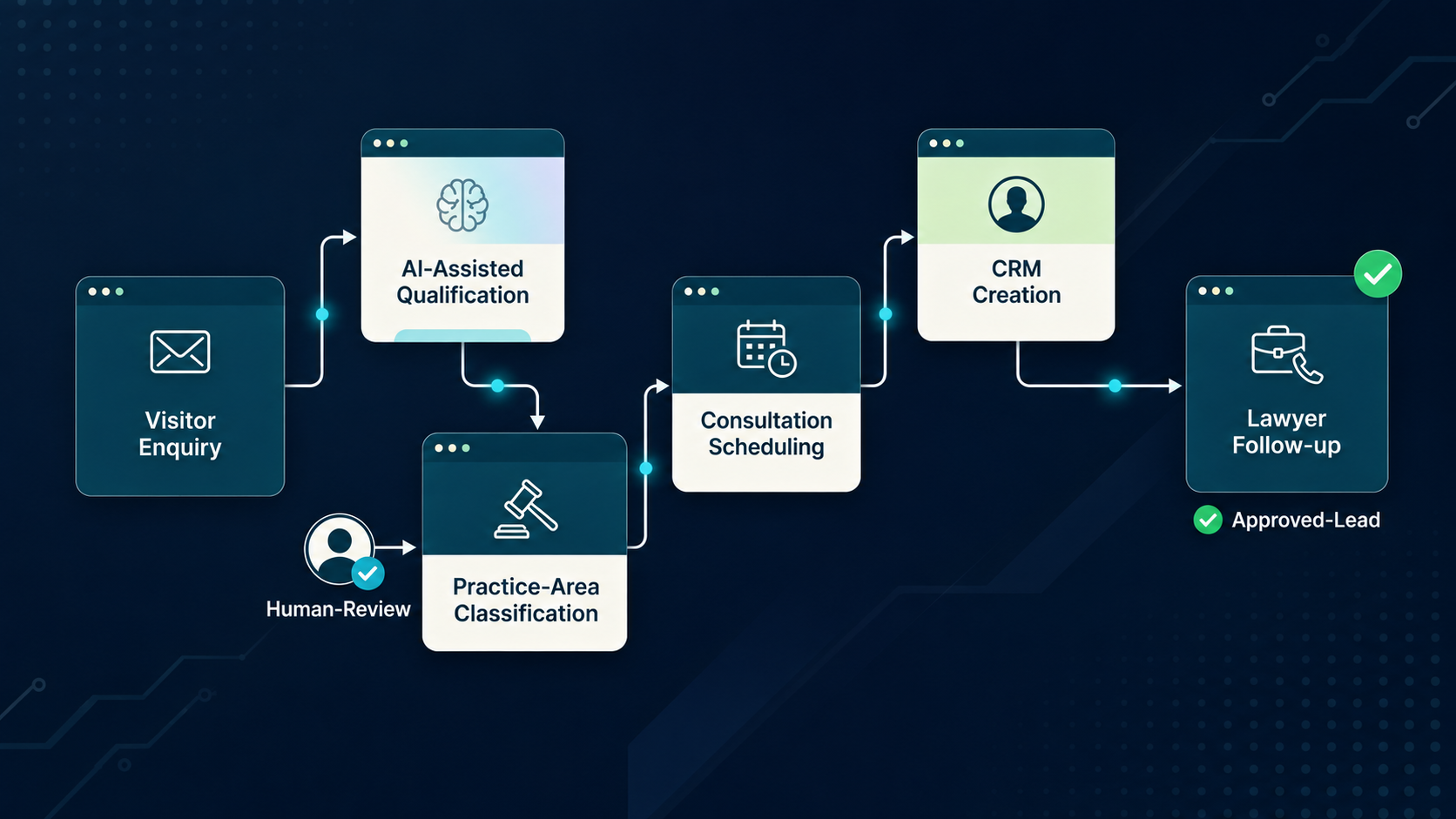
A legal workflow should be automated only after its trigger, inputs, decision rules, human judgment, exceptions, outputs and records are mapped. The implementation can then assign stable logic to conventional automation, language-heavy steps to AI where appropriate, and high-consequence decisions to people with explicit review and escalation.
Map the current workflow
Workflow automation begins with observation. Document how the process actually operates, including triggers, inputs, decision points, handoffs, workarounds, exceptions and outputs. The written procedure may not reflect daily practice, and those differences often explain why an automation project fails.
The map should identify authoritative systems and ownership. If a matter number comes from one system, contract status from another and approval from email, the automation design needs to resolve those dependencies rather than assume one clean data source. Mapping creates a shared specification for legal, operations and technology teams.
Trigger and inputs
A reliable workflow needs a clear trigger and minimum input set. Intake may begin with a form, email, system event or scheduled task. The automation should define what information is mandatory, what can be inferred and what happens when inputs are missing or inconsistent.
Input quality should be validated before downstream automation. A language model can summarize a vague request, but it cannot turn missing facts into reliable facts. The workflow may therefore need a clarification step or human triage before more advanced processing begins.
Rules versus AI decisions
Deterministic rules are preferable when the logic is explicit and stable. They are easier to test, reproduce and audit. AI may be useful when the workflow requires classification, extraction, summarization or interpretation of unstructured language. Hybrid designs often produce stronger control than forcing every step into one technology.
The design should mark probabilistic steps clearly because they affect downstream reliance. If an AI classification determines which contract approval path is used, the team may require confidence thresholds, review or validation before the routing decision becomes final.
Human checkpoints
Human checkpoints should sit at meaningful risk transitions. A reviewer might validate extracted obligations, approve a proposed clause, confirm an exception or authorize an external communication. The checkpoint should provide the information needed for the decision and record the result where auditability matters.
Too many approvals can erase the value of automation, while too few can create uncontrolled risk. The right number depends on consequence, reversibility, uncertainty and the organization's risk appetite. Workflow testing should include the burden created by review, not only the automated step.
Exception paths
A production workflow needs explicit exception handling. Examples include missing documents, ambiguous requests, conflicting policies, unsupported file types, low-confidence classifications or system outages. The automation should stop or route these cases instead of forcing them through a normal path.
Exceptions are also learning data. Repeated exception categories may show that the workflow needs redesign, source material needs cleanup or the chosen automation method is unsuitable. Monitoring exception patterns creates a feedback loop for improvement.
Integrations and records
Automation often depends on contract systems, matter management, document repositories, email, ticketing or identity platforms. Each integration should have defined permissions, data fields, failure behavior and ownership. A workflow should not silently continue if a critical system did not update.
The system of record should remain clear. Generated summaries or extracted data may support work, but the team should know which record is authoritative and how corrections propagate. This is especially important when AI-generated information is written back into operational systems.
Audit trail
The audit trail should be proportionate to the workflow. Useful records may include trigger, source documents, rules or models used, human approvals, exceptions, changes and final actions. Agentic or high-consequence workflows may require more detailed logs than routine administrative automation.
Auditability supports incident investigation, quality review and governance. It also helps teams understand whether a problem came from source data, a rule, a model, integration or human decision. Without that context, improvement becomes guesswork.
Metrics and continuous review
Measure the workflow against a baseline. Depending on the process, useful evidence can include turnaround, manual touches, review effort, error corrections, exceptions, escalations, user adoption and control failures. The team should select measures that reflect the intended objective rather than defaulting to volume processed.
CLOC's legal-operations reporting emphasizes governance, structured pilots, training and business-impact measurement as AI becomes embedded in workflows. Continuous review should also account for system and vendor changes. A workflow should be reassessed when its assumptions materially change.
Workflow design checklist
Before development begins, the workflow owner should be able to draw the process from trigger to final record. The map should show required inputs, authoritative systems, deterministic rules, AI-supported decisions, human approvals, exception routes, integrations and the output that closes the task. If important decisions remain hidden in email, memory or informal judgment, the process is not yet ready for reliable automation.
The design should also define failure behavior. A connector may be unavailable, a source document may be missing, a user may submit contradictory facts or an AI classification may be uncertain. The workflow needs a safe response to each category rather than a generic error message. Clear failure states improve user trust and make testing more realistic. They also help the team decide where automation creates genuine operating value and where a manual or simplified path remains the better choice.
Implementation ownership after launch
A legal workflow needs a named owner after go-live. That owner should understand the business purpose, source systems, exception categories, control points and measures that justified deployment. Ownership matters because small changes in intake forms, approval rules, repositories or integrations can alter the behavior of the automated process even when the automation code itself has not changed.
The owner should coordinate periodic review with legal operations, technology and any other control functions relevant to the workflow. Review should ask whether the original problem still exists, whether users are following the designed path, whether exception volume is changing and whether a simpler process has become possible. This keeps automation aligned with the legal service rather than allowing the workflow to become permanent merely because it has already been built.
Frequently asked questions
What should be mapped before automating a legal workflow?
Map the trigger, required inputs, current steps, decision logic, human judgment, exceptions, systems, outputs, ownership and baseline before designing automation.
Which workflow decisions can be automated?
Stable deterministic decisions can often be automated with rules; probabilistic AI decisions need stronger review when consequences or uncertainty are material.
Where should human checkpoints sit?
Place human checkpoints before high-consequence, uncertain or difficult-to-reverse decisions and where professional judgment materially changes the outcome.
How should exceptions be handled?
Define explicit stop, clarification or escalation paths for missing data, conflicts, low confidence, policy exceptions and system failures.
What metrics should be tracked after automation?
Track workflow-specific baselines such as turnaround, manual touches, review effort, exceptions, rework, escalation, adoption and control effectiveness.
Evidence and sources
Related TechCorpLegal resources
About the research lead

Dr. Rahul Dev
Dr. Rahul Dev works across data science, patents, technology law, AI, legal workflows and business strategy. TechCorpLegal uses that interdisciplinary perspective to connect legal intelligence with governance, technology-selection and implementation decisions.
Identify Automation Opportunities
Start with the jurisdiction, workflow or business objective, current stage, systems or vendors involved, and the decision that needs to be made.
Information notice: This material is provided for information and research purposes only and does not constitute legal advice. Legal, regulatory, confidentiality, professional-responsibility and security requirements vary by jurisdiction, facts, systems and implementation context.
For a related law-firm decision, see U.S. NDA drafting workflow: structured inputs and lawyer review. This focused resource complements the present page rather than replacing its research.